A projected ghost works until someone spots the box it’s coming from. Hiding the projector and keeping it dry pull in different directions: tuck it into a box or a shrub and it can overheat, leave it in the open and the dew gets it. The makers’ manuals set the limits, and they’re stricter than the keystone slider suggests. For throw distance, lumens and the operating temperatures of each projector, see our whole-house projection guide.
Why the Projector Gives Itself Away
AtmosFX, which sells most of the Halloween projection scenes people use, names the problem: “Digital decorating works best as an illusion. If your audience can see the projector, the magic of the effect may be diminished.” There are two ways the projector shows itself:
- The hot spot. “A common issue caused by projector placement is a ‘hot spot.’ That means that while viewing your display, your audience is looking directly into the lens of your projector, creating a very bright spot in your image.”
- The beam. For windows: “If you point your projector directly at a window, your viewers may be able to see the bright beam of light coming from the machine.” For Hollusion mesh, a front-projected image can land on the mesh and the wall behind it, “causing a distracting double image.”
AtmosFX’s fix for the hot spot is also the fix for hiding the projector: “try positioning your projector lower to the ground and angling the projector upwards towards the window,” or “raise the height of the projector, either by using a ceiling mount or by placing the projector on a high shelf, then angling the beam downwards.” For Hollusions, it suggests putting the projector “off to the side so it’s out of sight.” Every one of those moves means tilting or angling the projector.
Sources: AtmosFX, How to Position Your Projector, AtmosFX, Window Projections, AtmosFX, Creating Hollusions.
The Numbers, Model by Model
Keystone correction squares up a picture thrown from an angle. It doesn’t mean the maker wants the projector tilted that far. The three manuals we read set their own rules for tilt, clearance and shutdown, and they don’t agree with each other:
| Epson Home Cinema 980 | Optoma GT1080HDR | Nebula Capsule 3 | |
|---|---|---|---|
| Tilt | Wants it to face the screen “squarely”; warns past 30° it “could be damaged”; never on its side | “flat” and “perpendicular to the screen” on page 14; no more than 15° on page 15 | None given; says tilting is “unnecessary” |
| Keystone the maker lists | ±30° vertical; horizontal works to about 30° left or right | “vertical +/-40°” | Auto keystone |
| Clearance | At least 7.9 in (20 cm) from a wall | At least 30 cm (11.81 in) around the exhaust vent; 100 mm (3.94 in) in the other diagrams | “Enough space”; no number |
| Shutdown | “no cool-down period” | 90 seconds on one page, “about 10 seconds” on another | Not stated |
| Starts when power returns | Direct Power On setting | Direct Power On setting | Runs on battery or adapter; no such setting in the manual |
| Rear-projection setting | Rear, Rear/Ceiling | Rear, rear-top | [Rear], [Rear Ceiling] |
Optoma disagrees with itself on tilt. Page 14 of the GT1080HDR manual says the “Projector should be placed flat on a surface and 90 degrees / perpendicular to the screen,” and: “Do not operate the projector in any orientation other that table top or ceiling mount. The projector should be horizontal and not tilted either forwards/backwards or left/right. Any other orientation will invalidate the warranty.” Page 15: “The tilt angle of the projector should not exceed 15 degrees.” Optoma’s product page advertises ±40° of vertical keystone. So the lawn trick of propping the front up to throw the picture onto a second story runs into a 15° ceiling, and by page 14’s wording, a warranty problem at any angle. Keep an Optoma level and let the short-throw lens and keystone do the work.
Epson wants it square, and 30° is a damage warning, not an allowance. The HC 980 guide’s placement page says “Place the projector so it squarely faces the screen, not at an angle. If you cannot install the projector squarely facing the screen, correct any resulting keystone distortion using the projector controls.” Its spec page warns “If you use the projector tilted at an angle of more than 30˚ it could be damaged and cause an accident,” and the placement page says “Do not operate the projector on its side.” Its horizontal keystone slider makes “effective corrections when the projection angle is about 30º right or left,” and “After correction, your image is slightly smaller.” So Epson leaves room for a modest angle with keystone, and none for treating 30° as a target.
Nebula says don’t tilt at all. The Capsule 3 manual: “It is unnecessary to tilt the projector towards the projection surface. You can correct the projection image with the builtin autofocus and auto-keystone correction.” Its menu has a [Projection Angle Alert] that “Shows an alert when the maximum projection angle is reached,” though the manual never says what that angle is.
Of the projectors in our roundup, the Optoma GT1080HDR has to stay level, and its 0.49 short-throw lens fills a big surface from close in without being propped up. The Epson HC 980 takes a modest angle with keystone, and the Nebula Capsule 3 fixes the angle in software.
Sources: Epson HC 980 specifications, Epson HC 980 placement, Epson horizontal keystone, Epson HC 980 Notices, Optoma GT1080HDR manual, Optoma GT1080HDR specs, Anker’s Nebula Capsule 3 manual (linked from soundcore’s Capsule 3 support page). Epson’s ±30° vertical figure is from the HC 980 spec sheet.
Inside the Window: The Dry Option
Rear projection onto a screen in the window is the setup where the weather never reaches the projector at all. The street sees the back of the image, so each projector has a mirror setting. Epson’s Rear mode “flips the image horizontally to project from behind a translucent screen.” Optoma lets you choose “between front, rear, ceiling-top, and rear-top.” Nebula’s [Rear] means “The device is located behind the projection surface.”
Don’t flip twice. AtmosFX’s display-mode guide says its Window Mode scenes are “usually ‘flipped’ horizontally so that it matches the other modes when rear-projected.” Our reading: a Window Mode file is already mirrored for the street, so it wants the projector in plain Front mode. Set Rear as well and the two flips cancel, and the street sees it backwards. Other modes, and anything that isn’t an AtmosFX Window Mode file, need the projector’s Rear setting. Before you commit, walk outside and look at something with a clear left and right, like a character’s hand or any on-screen text.
Where the projector sits. Centered and level behind the screen is the hot spot position. AtmosFX’s alternatives are to rest it “on a low table and pointing it up toward the window,” or place it “higher and angle the beam down or place it off to the side.” Each of those is a tilt, so check the table above first. On an Epson, keep the angle modest and square it with keystone. An Optoma has to stay flat, so raise or lower the whole projector (a taller or shorter table) instead of propping one end up.
Kill the room light. AtmosFX: “pull any blinds that are near the window,” “hang a dark sheet or blackout curtains,” and if the room opens onto another, “try hanging a curtain in the door or archway between the two rooms to block the light.” Outside, “Try replacing your porch light with a darker, Halloween-colored bulb.” Keep those curtains off the projector itself. Epson: “Do not cover the projector with a blanket, curtain, or tablecloth,” and near a wall, “leave at least 7.9 inches (20 cm) of space between the wall and the projector.” A curtain hung around the projector to hide its glow counts as a wall.
The screen. AtmosFX’s help center describes its Window Projection Material as “a white semi-translucent sheet of nylon” that it “specially created … to minimize hotspots, glare, and diffusion.” Its product page calls the same sheet “reusable washable woven polyester,” so AtmosFX disagrees with itself on the fabric. It was $15 on AtmosFX’s site on September 29, marked down from $25, for 4 by 6 ft, and we didn’t find it on Amazon. The window setup, including screen sizes and how far back the projector sits, is in our whole-house guide’s window section, and more window ideas are in the window displays guide.
Sources: Epson projection modes, Optoma GT1080HDR manual (p. 36), Anker’s Nebula Capsule 3 manual, AtmosFX display modes, AtmosFX projection materials, AtmosFX Window Projection Material, AtmosFX, Window Projections.
Projecting Out Through the Glass
The other indoor option keeps the projector inside and throws the picture out through a closed window onto the garage door, a Hollusion screen in the yard, or the side of the house next door (ask first). None of the makers whose manuals we read cover this, so what follows is our method:
- Lens close to the glass and square to it. Aim straight through the pane rather than at an angle.
- Clean the pane on both sides where the beam passes.
- Keep the room behind the projector dark, or the glass shows the room to the street.
- Test your window before the 31st. Throw a test picture through it and look for a dimmer picture, a faint second image, or light bouncing back into the room. If you see them, try another window or move the projector inside instead.
- Watch the frame. If a mullion, sash or blind rail clips the edge of the beam, move the projector. Epson’s Notices say “If the light from the projector is blocked, the area on which the light shines becomes hot which could cause it to melt, burn, or start a fire. Also, the lens may get hot due to the reflected light which could cause the projector to malfunction.”
The throw distance now includes the room. An Epson HC 980 at its widest zoom (a 1.21 ratio) sitting 12 ft back from the garage door makes a picture about 9.9 ft wide, and that 12 ft is measured from the lens, through the glass, to the door.
Sources: Epson HC 980 Notices, whole-house guide throw table.
Hiding It in the Yard
Behind a prop. AtmosFX: “a creatively placed prop can be used to hide your projector, keeping it out of your guests’ view,” and “Prop tombstones are especially great for hiding projectors.” One AtmosFX customer, Joe O., hid his behind a “free candy” welcome sign. The prop goes between the projector and the street, not between the projector and the picture. Leave the prop room to breathe: Epson’s 7.9 in, or Optoma’s 30 cm at the exhaust, applies to a tombstone as much as to a wall. For the rest of the scene, see our front yard graveyard guide.
Off the ground. Nebula’s manual says “Do not place this product on soft surfaces such as tablecloths or carpets, otherwise the product could be a fire hazard.” Epson’s says that for projectors with bottom intakes, “do not place anything under the projector, such as cloth or paper.” We’d treat grass, mulch and fallen leaves the same way. A board, a paver or a stand keeps the intake clear.
On a tripod. The Capsule 3 has a “1/4” Tripod Socket” on the bottom, and the manual says “You may also install the projector onto a tripod (sold separately).” Use a sturdy camera tripod and weigh or stake its legs against wind. The Nebula re-runs its keystone and focus when it moves ([Auto Keystone Correction After Movement] and [Auto Focus After Movement], with a [Motion Settings] sensitivity), so a tripod that sways in a breeze can set it refocusing mid-show. Once the picture is set, turn those settings off. Keep the Nebula’s power adapter indoors: the manual says “The adapter is for indoor use only.”
Not in a tree. A lamp projector strapped to a branch or post that moves in the wind is a bad idea by Epson’s own lamp warning: “If the lamp is subjected to vibrations or shocks, or if it is used for an overly extended length of time, the lamp may break or it may not turn on,” and “Do not swing or tilt the projector. Shards of glass may fall out and could cause an injury.”
From the porch ceiling. High and angled down is AtmosFX’s other hot-spot fix, and a covered porch keeps the rain off. Epson is firm about how: “You must install a ceiling mount when suspending the projector from a ceiling,” and its Notices say “Installing the projector on the ceiling or on a wall requires specialist knowledge. If installation work is not carried out correctly, the projector could fall down. This may result in injury or accidents. Contact your dealer to carry out the installation work.” Epson also wants the projector and mount secured “using wire that is strong enough to hold their weight.” Set the projector to Front/Ceiling (Epson) or ceiling-top (Optoma) so the picture isn’t upside down.
Use your projector maker’s own mount. Epson’s Notices refer to “the specific Epson mount that supports your projector.” Optoma’s manual says “To prevent damage to your projector, please use the Optoma ceiling mount,” allows a third-party mount only with the screw specification it lists, and warns “that damage resulting from incorrect installation will void the warranty.” It also asks for “at least 10 cm gap between the ceiling and the bottom of the projector.” A porch roof doesn’t keep off the dew and damp air covered below.
Mind the lasers. If a laser effect sweeps the same yard, keep it out of the lens. Epson: “Do not beam any lasers into the projector. If a high-powered laser is beamed through the surface of the projection lens, it can cause a malfunction.” Our laser and fog effects guide covers aiming.
Sources: AtmosFX, Creating Hollusions, AtmosFX, DIY Outdoor Enclosures, Epson HC 980 placement, Epson HC 980 Notices, Epson projection modes, Anker’s Nebula Capsule 3 manual.
What the Manuals Say About Boxes
A sealed tote is out: our whole-house guide quotes AtmosFX, Nebula and Epson on that.
Epson allows a cabinet only with ventilation. “Do not operate the projector in badly ventilated or narrow places, such as in a closet, AV rack, or book case,” and “Do not operate the projector in a closed-in cabinet or airtight location unless proper ventilation is provided. If the location is not sufficiently ventilated, hot exhaust from the projector will accumulate and could trigger the projector’s built-in protection circuits, and the projector may malfunction.”
Optoma says a fan isn’t enough if the air goes in circles. “Ensure that the intake vents do not recycle hot air from the exhaust vent.” And: “When operating the projector in an enclosed space, ensure that the surrounding air temperature within the enclosure does not exceed operation temperature while the projector is running, and the air intake and exhaust vents are unobstructed.” The next line is aimed at installers, but it says why: “All enclosures should pass a certified thermal evaluation to ensure that the projector does not recycle exhaust air, as this may cause the device to shutdown even if the enclosure temperature is with the acceptable operation temperature range.” Our method for a box: put the intake and exhaust openings on opposite sides, and give the exhaust side the bigger hole.
Nothing in front of the lens that can burn. Epson: “Do not place any flammable objects in front of the projector lens, otherwise, a fire may occur.” Optoma: “Do not block the light coming out of the projector lens when in operation. The light will heat the object and could melt, cause burns or start a fire.” A box’s front lip, a foam tombstone edge or a cornstalk leaning into the beam are all “objects” to those manuals. Before you close up an enclosure, project a plain white frame and check that no edge of the picture is dark or cut off. A clean frame means nothing is catching the beam.
Foam builds, with that rule applied. AtmosFX’s DIY enclosure roundup shows what customers built. Rick H. of Cincinnati used “A basic wooden enclosure surrounded by insulation foam for easy crafting” with a “built-in fan,” dressed as a tombstone. Tom H. of Tampa Bay turned a styrofoam cooler into one, and AtmosFX notes that “Many types of paint will break down the styrofoam, which adds to the worn-down stone look.” Another customer, Casey R., cut a styrofoam cooler in half with a hot wire cutter, carved “ventilation holes in the side,” a hole for the power cord, and a hole through the enclosure and the tombstone so the infrared remote would reach the projector. AtmosFX’s own rule for all of them: “any enclosure you create must allow for proper air circulation. Without air circulation, your projector may overheat and become permanently damaged.” Epson adds one for foam specifically: “Do not place anything that can become warped or damaged by heat near the exhaust vents.” Our take: foam works as the outside shell if the beam and the exhaust never touch it. Line the exhaust side with plywood or leave it open, and cut the front opening wider than the beam.
Keep water out from below as well as above. A roof or overhang past the front opening, a box raised off the lawn, and cords that enter from underneath with a drip loop (a dip in the cord below the entry hole, so water runs off the low point instead of into the box) are our additions. Our weatherproofing guide covers covers and cords for the rest of the yard.
What a store-bought enclosure gets you
AtmosFX sells two Illumibot enclosures. The Regular was $350 on its own or $750 with the Illumibot mapping device built in, on September 29, and the Large was $450 or $850. Both list a built-in power strip, an “Exhaust fan for heat management,” a “Washable air filter,” a “Projection window with protective covering,” a stainless steel eye bolt “for security” and lawn augers. AtmosFX calls them “Weather-resistant construction” and says they protect against “rain and snow” as well as “theft and vandalism,” but lists no IP rating and no list of projectors that fit. The Regular’s interior is 19.5 by 12.5 by 5.0 inches. An HC 980 (12.2 by 3.5 by 11.1 inches) goes in, but with less than the 7.9 inches Epson asks for between the projector and a wall, so you’re relying on the fan. The Large is 19.5 by 12.25 by 9.0 inches inside.
Outdoor AV enclosure makers sell housings built for year-round installs, at a higher price. DeerTV’s Medium Outdoor Projector Enclosure was $699 on September 29 (listed down from $1,200). DeerTV claims “Thermostat based internal temperature control” that “maintains inner temperature within 20-50C,” a “Fan-cooled projector enclosure,” and an acrylic window, and in its FAQ says “A heater system is optional.” The projector’s own operating range and humidity limits still apply inside the box.
Sources: Epson HC 980 Notices, Optoma GT1080HDR manual (pp. 4, 15), AtmosFX, DIY Outdoor Enclosures, AtmosFX, Building a Projector Enclosure From Styrofoam, Illumibot Regular Enclosure, Illumibot Large Enclosure, DeerTV Medium Outdoor Projector Enclosure.
Dew, Cold and the Walk Back Inside

The best nights for a projection show are clear and still. The National Weather Service’s frost page describes the same nights from the other side: “Dew is commonly formed on clear nights when the winds are calm, soil is moist, and a low dew point depression exists (dew point depression is the difference in air temperature and dew point temperature).”
That matters because of what the makers allow. The NWS defines the dew point as “the temperature the air needs to be cooled to (at constant pressure) in order to achieve a relative humidity (RH) of 100%.” Optoma’s manual gives “Relative humidity is 10% ~ 85%” as the operating range, and Epson’s HC 980 spec says “(No condensation)” next to its operating temperature. Once the air cools to its dew point, it’s outside both, and a porch roof doesn’t change the air.
The lawn is colder than the forecast. The same NWS page: “NWS temperature observations are taken at an elevation of five feet above ground level. Cold air sinks, so the coldest air will be near ground level, with near surface air temperatures potentially being several degrees colder than what is being measured at standard NWS observation sites.” A projector on a stake a foot off the lawn sits in that colder layer.
How we’d read the forecast. Pull up the hourly forecast for the 31st and compare the temperature and dew point lines after sunset. When the gap between them closes to a few degrees on a clear, calm evening, expect dew on the lens, the enclosure window and the projector itself. Plan on the window or the garage that night. The whole-house guide’s operating temperature table covers the cold side.
Bringing it back in. Epson’s troubleshooting page: “To avoid condensation on the lens after bringing the projector in from a cold environment, let the projector warm up to room temperature before using it.” Epson gives no time. Its Notices add “Do not use or store the projector where it may be exposed to sudden changes in temperature,” and “Do not store the projector outdoors for an extended length of time.” So it comes in every night, and it doesn’t go straight back out into damp air from a warm house either.
Wiping the lens. Nebula: “Do not use any liquid cleaning agents to clean the lens to avoid damaging the film coating on the lens,” and “Use lens cleaning paper to clean the lens.”
If it gets rained on, it’s out of service until it’s been checked. Epson says to unplug it and “refer servicing to qualified service personnel” if it “has been exposed to rain or water.” Optoma lists “Projector has been exposed to rain or moisture” among the conditions for stopping use. Nebula: “do not expose the product to rain or moisture.”
Sources: NWS Charleston, WV frost and freeze information, NWS La Crosse, dew point vs humidity, Optoma GT1080HDR manual, Epson HC 980 specifications, Epson, fuzzy or blurry image, Epson HC 980 Notices, Anker’s Nebula Capsule 3 manual.
Power, Timers and Shutdown
GFCI first. The CPSC’s GFCI fact sheet says a GFCI trips when current differs “by a very small amount (as little as 0.006 amperes)” and that the electrical code has required GFCI protection on outdoor receptacles “since 1973,” with the caveat that “The NEC typically only applies to new construction/major renovations.” An older house can have unprotected outdoor outlets. The fix the CPSC names: “Another type of portable GFCI is an extension cord combined with a GFCI.” Test it “After installation,” “At least once a month,” and “After a power failure,” since “Blackouts and other power disturbances can sometimes damage” a GFCI.

DEWENWILS 3 ft Automatic Reset GFCI Extension Cord
The CPSC's 'extension cord combined with a GFCI': a short in-line GFCI cord that goes in at the outlet, with the rest of the cords running from it. It's sold as automatic-reset, so it comes back on by itself after an outage. The CPSC still says to test a GFCI after a power failure, so press its test and reset buttons then, and before each night.
Timers and Direct Power On. Both big projectors can start on their own when a timer restores power. Epson’s Direct Power On “lets you turn on the projector by plugging it in without pressing the power button.” Optoma’s Direct Power On: “The projector will automatically power on when AC power is supplied.”
- Epson says cut the power whenever you like. “Since the projector supports the direct shutdown feature, it can be turned off directly using the breaker,” and “With Epson’s Instant Off technology, there is no cool-down period so you can pack up the projector for transport right away.” A plain timer that cuts power at midnight suits the HC 980.
- Optoma says wait, then disagrees with itself on how long. Page 5: “When switching the projector off, please ensure the cooling cycle has been completed before disconnecting power. Allow 90 seconds for the projector to cool down.” Page 20: “The cooling fans will continue to operate for about 10 seconds for the cooling cycle,” and the On/Standby LED “turns solid red” once it’s in standby. A timer that simply cuts power breaks that instruction. The workaround is Optoma’s Auto Power Off: “The countdown timer will start, when there is no signal being sent to the projector. The projector will automatically power off when the countdown has finished.” Set the media player or the playlist to stop first, let the projector shut itself down, and have the plug timer cut power a few minutes after that.
- The Nebula switches itself off. Its manual: “In HMDI [sic] Source Mode, the projector will switch to standby mode after 10 minutes of button inactivity or when no signal is detected,” and “When standby mode lasts for 30 minutes, the projector will automatically power off.” Read literally, that’s 10 minutes with no button press, even with a loop playing. Check the auto-sleep options under [Power] before you leave it running from a streaming stick, and run a full test the week before.
For the switching hardware itself, including outdoor smart plugs and their ratings, see our yard haunt automation guide. For cord gauge and routing, see Lighting Your Haunt, Part 4.

BN-LINK Outdoor Power Stake Timer, 6 Outlets
A lawn stake with outlets, a mechanical timer dial and a cover that closes over plugged-in cords. It has no GFCI of its own, so feed it from a GFCI outlet or GFCI cord. Fine for an Epson on Direct Power On; with an Optoma, set the off time a few minutes after the projector's own shutdown.
Cover the connections. Where the projector cord meets the extension cord, a covered box keeps the plug out of the wet grass.
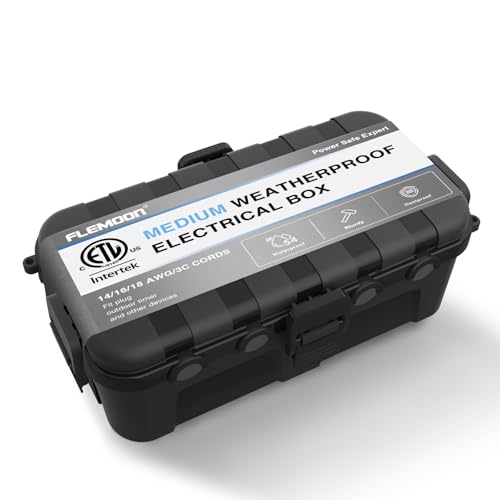
Flemoon Medium Outdoor Electrical Box
A lidded box for the plug-to-cord connection, with gasketed cord ports. The gaskets only seal around cords they're sized for, and heavy 12-gauge cord may be too thick, so check the port size against your cords first. Lay it flat, not on its side, and keep it out of puddles.
At the outlet. Epson: “Place the projector near a wall outlet where the plug can be easily unplugged,” and “Do not touch the plug during an electrical storm.” The Capsule 3’s adapter stays inside, and Nebula recommends charging and running on the adapter between 41°F and 77°F.
Sources: CPSC GFCI fact sheet, Epson extended menu, Epson turning off the projector, Optoma GT1080HDR manual (pp. 5, 20, 36), Anker’s Nebula Capsule 3 manual, Epson HC 980 Notices.
What the Warranties Actually Say
AtmosFX’s blog says “using a projector outside will void the warranty on most projectors,” and its help center says “weather damage will void the warranty on most digital projectors.” Those are AtmosFX’s summaries. The makers’ own wording:
- Epson’s two-year limited warranty never uses the word “outdoors.” It excludes “Damage resulting from operation or storage in areas with smoke, oil, high humidity, steam, corrosive gases or chemicals, excessive dust, vibration, or shock,” “Any damage caused by installing the projector next to a heat source or directly in the path of an air vent or an air conditioner,” and “disasters such as fire, flood, or lightning.” A dew night is high humidity.
- Optoma’s manual says any orientation other than table top or ceiling mount “will invalidate the warranty,” which is the tilt rule again.
- Nebula’s manual: “If physical injury, loss of data, or damage is caused by failure to follow instructions, the warranty does not apply,” and the instructions include keeping it out of rain and moisture.
Sources: Epson projector warranty, AtmosFX outdoor setup, AtmosFX help center, Optoma GT1080HDR manual, Anker’s Nebula Capsule 3 manual.
Theft and Take-Down
AtmosFX’s outdoor checklist ends on “Expensive equipment left outside can be stolen. Don’t leave your projector unattended.” Commercial enclosures answer that with locks; AtmosFX notes they “may also feature a lock to secure your projector from theft,” and the Illumibot boxes have an eye bolt “for security,” which we’d use with a cable lock. A foam tombstone has neither, so the projector is only out while someone’s home and watching the yard.
When the night’s over, Epson’s order is: “Before you move the projector, make sure its power is turned off, the plug is disconnected from the outlet, and all cables are disconnected.” On an Optoma, wait for the solid red standby light first. Then bring it in to warm up before the case comes off, and leave it inside until the next show. Picks for each kind of setup are in our best Halloween projectors roundup.
Sources: AtmosFX outdoor setup, Epson HC 980 Notices.